Overview of Recall AI Feature
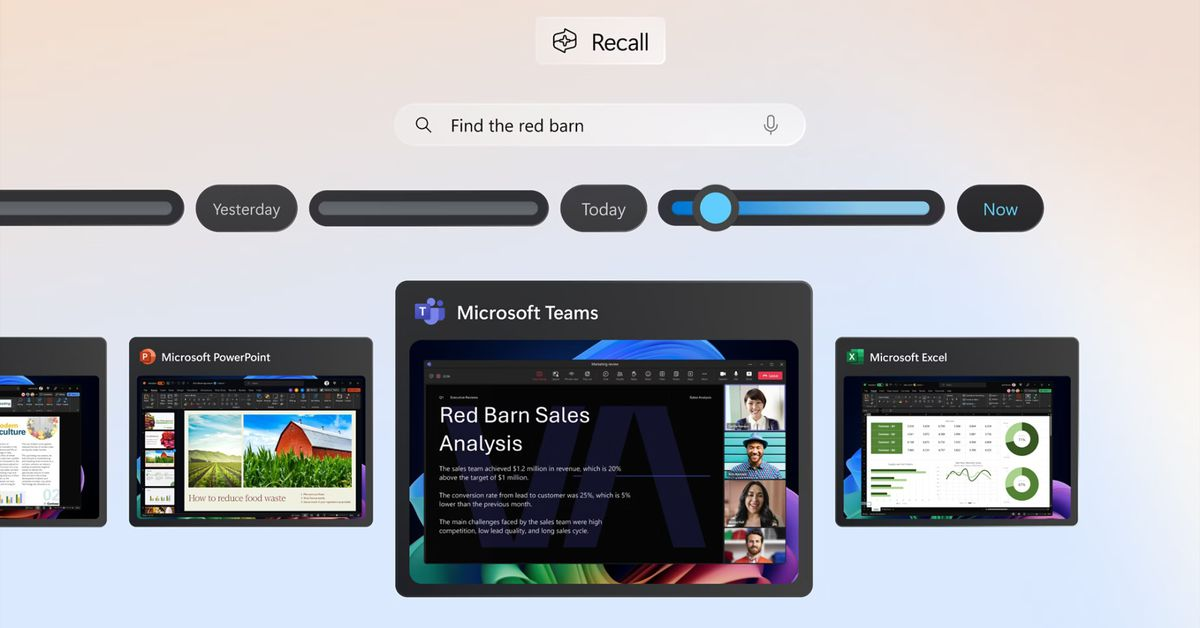
Microsoft has introduced the Recall AI feature for Copilot Plus PCs, allowing users to easily retrieve their previous activities. Available first to Windows Insiders in the Dev Channel, Recall captures screenshots of user actions, making it searchable through natural language queries. This feature helps users quickly find apps or websites they were using at specific times. Alongside Recall, Microsoft has also launched Click to Do, which enables AI-driven actions on text and images from these snapshots.
Key Features and Functionality
- Recall takes screenshots of user activities, allowing for easy searches.
- A scrollable timeline enables users to revisit their past activities by date.
- Users have control over which snapshots are saved and can delete them anytime.
- Sensitive information is automatically detected and excluded from snapshots.
- Click to Do allows users to interact with text and images from snapshots for easier actions.
Significance of Recall AI
The launch of Recall is a significant step in Microsoft’s AI strategy for Windows. Initially delayed due to security concerns, the feature emphasizes user privacy, as Microsoft does not access or store snapshots on the cloud. By making Recall an optional feature, Microsoft aims to enhance user experience while maintaining control over their data. This development reflects the growing trend of integrating AI into everyday computing, making tasks more efficient and intuitive for users.